TaxMeter.ch
A tax tracking app for Swiss sole proprietors — designed, built, and shipped from concept to MVP in one day.
PRODUCT DESIGN · iOS DEVELOPMENT · 2026
4 Core Features | 25+ Municipalities | 0 Servers
PROJECT OVERVIEW
Every sole proprietor in Canton Zurich faces the same problem: they don't know how much of their income to reserve for taxes until the Steuerrechnung arrives. The math is layered across AHV social security, cantonal tax, municipal tax, federal tax, and optional church tax — each with different rates, multipliers, and brackets.
TaxMeter replaces the guesswork with a real-time calculation engine that runs entirely on the user's phone. No cloud. No subscriptions. No data leaves the device.
Role: Product Designer & Developer
Timeline: February 2026 (1 day to MVP)
App: iOS (React Native + Expo)
Website: React + Vite + Tailwind, deployed on Vercel
Code: github.com/KarolinaBittman/taxmeter-website
Status: MVP Complete — Testing & App Store Prep
Pricing: Free on App Store (no paywall for v1)
Live site: taxmeter.ch →
THE PROBLEM
The Tax Reserve Mystery Icon: Calculator or gauge "How much should I set aside this month?" Income fluctuates. Tax rates are layered across five authorities. Most entrepreneurs guess — and guess wrong. They either overpay provisionally or face a surprise bill.
Provisional Bill Confusion Icon: Document with question mark "My Steuerrechnung seems too high." The canton estimates your taxes based on last year's income. If this year is different, the bill is wrong — but most people pay without questioning.
Fragmented Tools Icon: Puzzle pieces "I need three apps to run my business?" Invoicing is Bexio (CHF 30/month). Expenses are a spreadsheet. Tax estimation is a Treuhänder. There's no single, affordable tool that combines all three.
THE SOLUTION
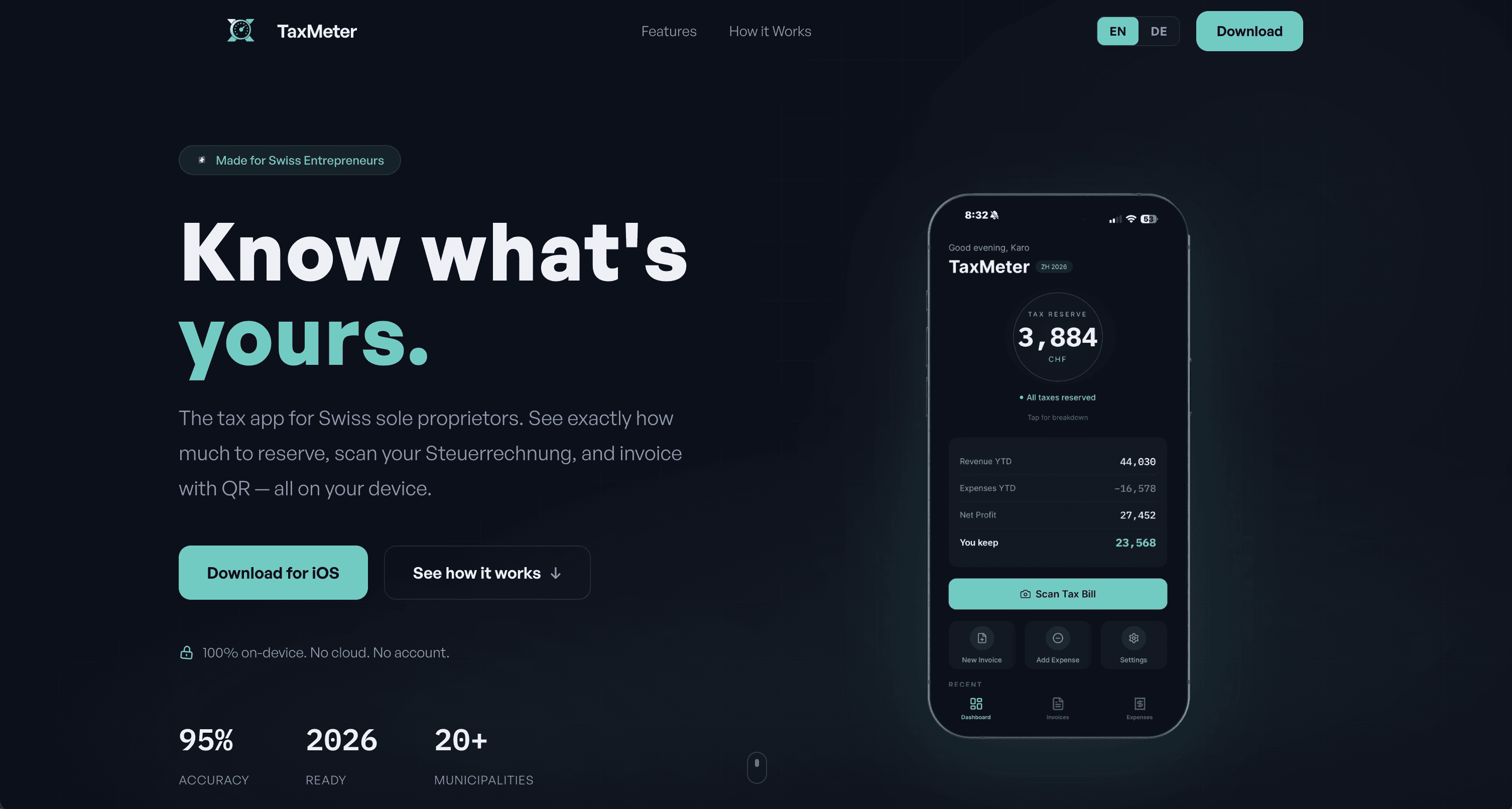
Tax Meter (The Solaris Orb) Screenshot: Dashboard with the glowing orb The signature element. A real-time tax reserve calculator displayed as a glowing orb on the dashboard. It calculates AHV/IV/EO (including the sliding scale), cantonal, municipal, federal, and church taxes — specific to the user's exact municipality.
The orb changes color based on actual reserves: teal when fully funded, amber when getting close, coral when critically low. Tap it for a full breakdown of every tax component.
Bill Buster Screenshot: Bill Buster comparison screen Scan or enter the amount from your Provisorische Steuerrechnung. TaxMeter compares it against your actual year-to-date income. If you're overpaying, it generates a formal Einsprache letter in German — addressed to the Steueramt, ready to print.
QR Invoicing Screenshot: New invoice screen or QR-bill PDF Swiss QR-bill invoices in one tap. Enter client, amount, done. TaxMeter generates a PDF following the SIX SPS v2.3 standard with the QR payment slip. When marked as paid, revenue flows directly into the dashboard calculations.
Expense Tracking Screenshot: Expense scan or expense list Photograph a receipt. TaxMeter extracts merchant, amount, and date using on-device OCR. Categorize it, and the deduction is immediately reflected in your tax calculation. Receipt photos stored locally — never uploaded anywhere.
WIREFRAMING
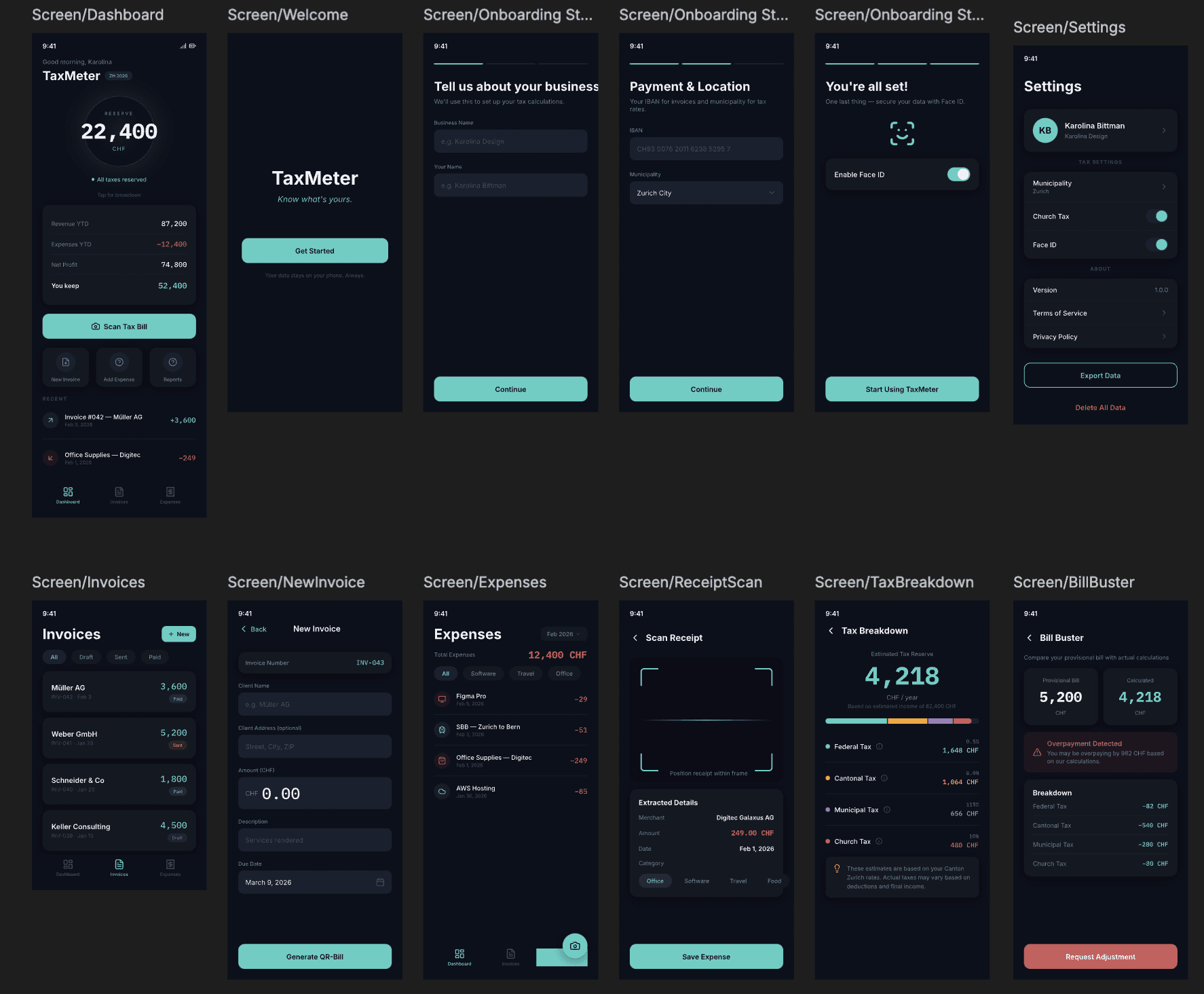
12 screens designed in Pencil.dev before writing a single line of code.
Before any code was written, the entire app was wireframed using Pencil.dev — an AI-powered design tool that generates production-ready mobile screens from text prompts. The process took three prompt iterations to get right.
The first attempt produced generic, flat screens with poor visual hierarchy. The second iteration introduced the dark mode specification, explicit font requirements (General Sans + IBM Plex Mono), and the near-black color system. The third and final iteration achieved the premium aesthetic: large monospaced numbers as focal points, elevation-based card hierarchy instead of borders, circle icons for quick actions, and the Solaris Orb as the dashboard centerpiece.
The result was a complete 12-screen blueprint covering every user flow: onboarding with municipality selection, the main dashboard with real-time tax calculations, invoice creation with QR-bill preview, expense tracking with receipt scanning, a full tax breakdown with reserve ledger, and the Bill Buster comparison tool. These wireframes became the direct reference for Claude Code during implementation — the design system tokens, spacing, and component structure were translated into a CLAUDE.md file that guided every line of generated code.
DESIGN SYSTEM
Near-black. Teal accents. Apple-level polish.
Layout: Color palette strip + typography samples + orb states.
Text: The visual direction was deliberately anti-tax-software. Where competitors use light backgrounds and spreadsheet aesthetics, TaxMeter chose a near-black theme (#0C0F1A) inspired by premium fintech apps. One hero accent color (teal #4ECDC4) carries the entire UI — buttons, positive numbers, active states, the orb's safe glow.
Color palette strip (show the actual swatches): #0C0F1A — Screen background #141820 — Cards #4ECDC4 — Teal (primary accent) #CD5B5B — Coral (expenses, danger) #F5A623 — Amber (warnings) #9B7FB8 — Mauve (low income state) #F0F0F5 — Primary text #8E95B4 — Secondary text
Typography: General Sans — Headings and body IBM Plex Mono — All financial numbers "When you see monospaced text, it's money."
Solaris Orb States (show 4 orb screenshots or mockups): Teal: "All taxes reserved ✓" Amber: "Almost there — CHF X to go" Coral: "Reserve running low" Mauve: "Start reserving now".
TECHNICAL ARCHITECTURE
Everything runs on your phone. That's the point.
TaxMeter requires zero servers, zero cloud databases, zero API calls at runtime. The entire app runs on-device using SQLite for storage and pure TypeScript for tax calculations. This wasn't a compromise — it was a deliberate architectural choice driven by Swiss privacy expectations, zero operational cost, and offline reliability.
APP:
Framework → React Native + Expo (SDK 54)
Language → TypeScript (strict mode)
Database → SQLite via expo-sqlite
OCR → Google ML Kit (on-device)
QR Bills → swissqrbill (open source)
State → Zustand
Auth → expo-local-authentication (Face ID)
WEBSITE:
Framework → React + Vite
Styling → Tailwind CSS
nimations → Framer Motion
Hosting → Vercel (free tier)
Domain → taxmeter.ch
Source → GitHub (public repo)
Key number: 29 unit tests validate the tax engine across edge cases, Swiss rounding, cross-municipality comparisons, and married vs. single tariffs.
PROCESS
From idea to MVP in one week.
The original roadmap allocated six weeks. Using AI-assisted development with Claude as architecture partner and Claude Code for implementation, all five phases were completed in a single session. The workflow:
Phase 1 — Tax Engine Pure TypeScript module with ZH 2026 brackets, AHV sliding scale (31 brackets), and 29 passing unit tests.
Phase 2 — App Shell Three-tab navigation, SQLite schema with 6 tables, design system implementation, font loading.
Phase 3 — Camera + Expenses Receipt scanning with on-device OCR, expense categorization, real data wiring to dashboard calculations.
Phase 4 — QR Invoicing SIX-standard QR-bills, invoice status workflow (Draft → Sent → Paid), automatic revenue tracking.
Phase 5 — Bill Buster + Polish Tax bill scanning and comparison, 3-step onboarding, settings, haptic feedback, animated Solaris orb.
Landing Page — Same day React + Tailwind site at taxmeter.ch with real app screenshots, responsive design, legal disclaimer.
Key design decisions
"Zurich only" Started as a 4-canton app. Narrowed to Canton Zurich for accuracy and trust. One canton done properly beats four done halfway.
"Navy → Near-black" Early designs used navy (#141B2D). On-device testing revealed it looked too blue. Shifting to #0C0F1A created the premium feel we wanted.
"Reserve ledger, not a single number" The "Money Set Aside" feature evolved from one editable field to a full transaction ledger with dates and notes. Real financial tracking needs an audit trail.
THE WEBSITE
taxmeter.ch — "Know what's yours."
The marketing site mirrors the app's aesthetic — near-black background, teal accents, and the iPhone mockup showing the live dashboard. Sections address each pain point directly, walk through a three-step setup, and lead with the privacy differentiator: "100% on-device. No cloud. No account."
Built with React + Vite and Tailwind CSS, coded in VS Code with Claude Code extension, and deployed on Vercel. The source code is public at github.com/KarolinaBittman/taxmeter-website. Custom domain taxmeter.ch configured via Vercel.
Link button: Visit taxmeter.ch →
CURRENT STATUS + NEXT STEPS
What's live. What's next.
The marketing site mirrors the app's aesthetic — near-black background, teal accents, and the iPhone mockup showing the live dashboard. Sections address each pain point directly, walk through a three-step setup, and lead with the privacy differentiator: "100% on-device. No cloud. No account."
Built with React + Vite and Tailwind CSS, coded in VS Code with Claude Code extension, and deployed on Vercel. The source code is public at github.com/KarolinaBittman/taxmeter-website. Custom domain taxmeter.ch configured via Vercel.
Link button: Visit taxmeter.ch →
Now (teal accent): ✓ Functional MVP running on iPhone via Expo Go ✓ All four core features operational ✓ TypeScript — zero compilation errors ✓ 29 tax engine unit tests passing ✓ 25+ municipalities with verified Steuerfüsse ✓ Landing page live at taxmeter.ch ✓ Website source on GitHub (open) ✓ Domain secured, deployed on Vercel
Next (secondary text): → Development build via Xcode (free provisioning) → German language support (app + landing page) → TestFlight beta with Swiss sole proprietors → App Store submission — free, no paywall for v1 → Android release (same codebase, Google Play) → Expand to all 160 ZH municipalities → Potential monetization after user validation
REFLECTION
What AI-assisted development actually looks like.
This project tested a hypothesis: can a designer with limited coding background ship a production-quality native app in a day using AI tools?
The answer is yes — with nuance. The most valuable part wasn't code generation. It was the architecture phase: narrowing scope, simplifying features, researching Swiss tax law, structuring the database. The strategic decisions emerged from dialogue, not prompts.
Code generation was fast but required constant course correction. Every phase compiled cleanly, but real-device testing revealed animation glitches, accessibility failures, and layout issues that couldn't be caught in isolation. The human feedback loop — build, test on phone, describe what's wrong, fix — was essential.
The biggest lesson: AI doesn't replace design judgment. The color palette went through three iterations. The Solaris orb's meaning evolved through conversation. The shift from navy to near-black came from seeing it on a real screen. The human eye remains irreplaceable.